Dielines and 3D mockups, right inside Illustrator
Browse 37,000+ production-ready dielines, design your packaging inside and out, place any one at true size, and turn your artwork into a 3D mockup — all without leaving Adobe Illustrator.
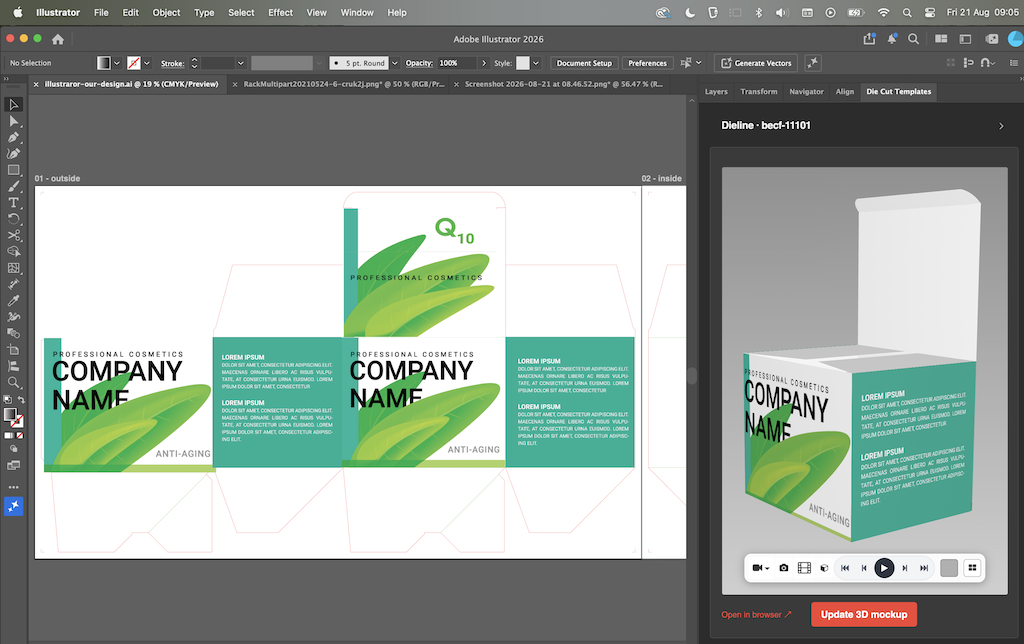
Everything you need, in one panel
Browse the full catalog
Search every category and template from a panel docked right next to your canvas.
Place at true size
Drop any dieline onto your artboard at exact dimensions, with cut and crease layers kept intact.
Design inside and out
Design the outside and the inside of your packaging in the same document, and see both surfaces on your 3D mockup.
One-click 3D mockup
Turn your flat artwork into a photorealistic 3D mockup with a single click.
Export OBJ & GLB
Export your finished mockup out as a 3D model for Blender, Adobe Dimension.
Export up to 8K video
Render a smooth 360° cinematic MP4 of your mockup at up to 8K Ultra HD — right in your browser.
Free to start
Download the plug-in free and customise the demo template — a Tuck Top Auto Bottom box (becf-11101) and its 15 variations. A monthly or annual subscription unlocks all 37,000+ templates in the catalog.
How to install
Get it on Adobe Exchange
Open our Adobe Exchange listing from the button above, sign in with your Adobe account, and click Install.
Adobe installs it for you
The Creative Cloud desktop app adds the panel to Illustrator automatically — no file to download or unpack.
Open it in Illustrator
Restart Illustrator if it's open, then find the panel under Window ▸ Extensions ▸ Die Cut Templates.
Sign in
Log in with your Die Cut Templates account and start placing dielines.
The panel is published on Adobe Exchange by Die Cut Templates.
Requirements
Adobe Illustrator
Version 2021 (25.0) or newer.
macOS or Windows
Runs wherever your Illustrator runs.
A Die Cut Templates account
Sign in to browse the demo; a subscription unlocks full downloads and 3D mockups.
Bring your dielines into Illustrator
Install the panel and sign in with your Die Cut Templates account to get started.
Get it on Adobe ExchangeWhat’s new
Highlights of this release:
- When the floating panel is taller than your screen, it now shows a scrollbar so you can always reach the buttons and options at the bottom — they are no longer cut off below the edge of the display.
- This applies to every view — browsing dielines, the dieline options form, and the 3D mockup — so nothing is left unreachable on a shorter screen.
 Die Cut Templates is an online packaging template collection, custom dieline generator, template maker and a packaging design tool with nesting, manufacturing cost calculator and 3D capabilities. All of the packaging templates are easy to download.
We have over 35,000 vector packaging templates (dielines) for tuck end boxes, snap lock boxes, tuck top auto bottom boxes,
standard boxes, four corner tray boxes, fruit and vegetable boxes, special boxes, separators, paper bags, gift boxes
and a great number of packaging templates. With Die Cut Templates, you can arrange your dielines using the nesting tool.
Die Cut Templates also offers uploading your logos and artwork for your 3d Mockup designs and offers online previews in 3D.
Die Cut Templates also provide a Dielines API.
Dielines API allows for generating custom dielines in PDF, DXF, and SVG formats, along with 3D mockups and nesting.
Die Cut Templates is an online packaging template collection, custom dieline generator, template maker and a packaging design tool with nesting, manufacturing cost calculator and 3D capabilities. All of the packaging templates are easy to download.
We have over 35,000 vector packaging templates (dielines) for tuck end boxes, snap lock boxes, tuck top auto bottom boxes,
standard boxes, four corner tray boxes, fruit and vegetable boxes, special boxes, separators, paper bags, gift boxes
and a great number of packaging templates. With Die Cut Templates, you can arrange your dielines using the nesting tool.
Die Cut Templates also offers uploading your logos and artwork for your 3d Mockup designs and offers online previews in 3D.
Die Cut Templates also provide a Dielines API.
Dielines API allows for generating custom dielines in PDF, DXF, and SVG formats, along with 3D mockups and nesting.