If you design packaging in Adobe Illustrator, you already know the routine: download a dieline, open it, line up your artwork, export an image, then come back to Die Cut Templates to see it as a 3D mockup. It works — our guide to adding artwork to 3D mockups walks through every step — but it means hopping between your browser and Illustrator on every change.
Our new Adobe Illustrator plug-in removes that round-trip. You browse the full catalog, place a dieline at true size, and turn your artwork into a 3D mockup — all from a panel docked right next to your canvas.
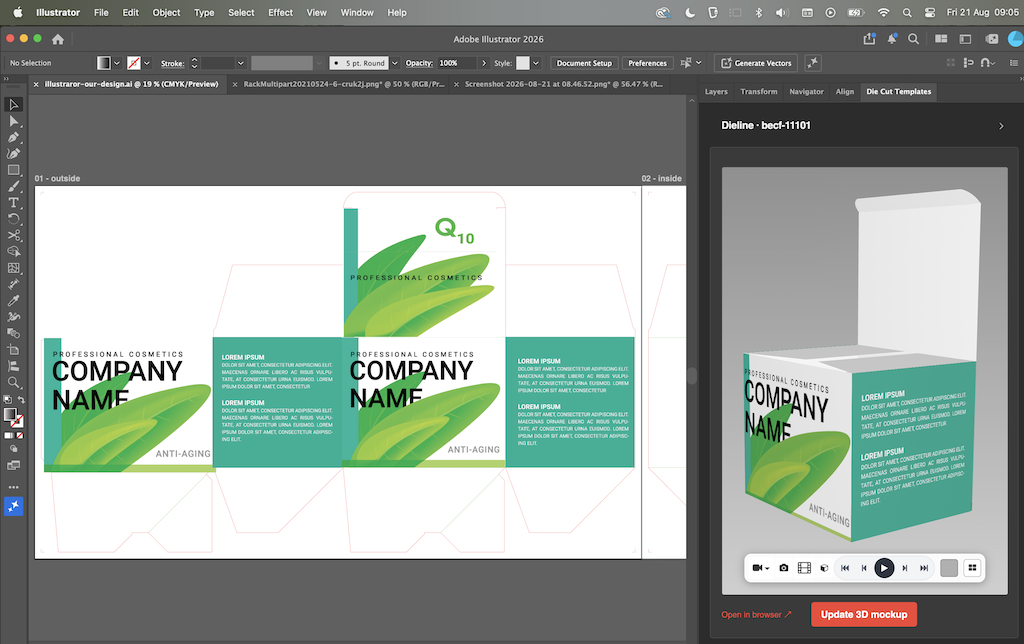
The old way vs. the plug-in
Here is the same job done both ways:
- The manual way: download the dieline → open it in Illustrator → design your artwork → export an image → upload it on the website to preview the 3D mockup. Repeat the export-and-upload loop for every revision.
- With the plug-in: search the catalog in the panel → drop the dieline onto your artboard at exact size → design → click once to generate the 3D mockup. No exporting, no re-uploading, no switching apps.
What the plug-in does
Browse 37,000+ dielines without leaving Illustrator
Search every category and template from a panel docked next to your canvas, the same catalog you would browse on the website.
Place a dieline at true size
Drop any dieline onto your artboard at its exact production dimensions, with the cut and crease layers kept intact. The artboard auto-fits the dieline with even margins, so it is ready for artwork straight away — no manual scaling or alignment.
Turn artwork into a 3D mockup with one click
When your design is ready, one click turns the flat artwork into a photorealistic 3D mockup. You can then render a smooth 360° cinematic MP4 of it at up to 8K Ultra HD, right in your browser.
Trying it out (it's free to start)
The plug-in is free to download. You can place and customise the demo template — a Tuck Top Auto Bottom box
(becf-11101) and its 15 variations — at no cost. A monthly or annual Die Cut Templates subscription unlocks
all 37,000+ templates in the catalog.
You will need Adobe Illustrator 2021 (25.0) or newer on macOS or Windows, and a Die Cut Templates account.
The button above takes you to the plug-in page, where you can get it on Adobe Exchange and follow the step-by-step
install guide.
Note: the panel is published on Adobe Exchange by Die Cut Templates.
If you run into anything or have feedback, we would love to hear it.
 Die Cut Templates is an online packaging template collection, custom dieline generator, template maker and a packaging design tool with nesting, manufacturing cost calculator and 3D capabilities. All of the packaging templates are easy to download.
We have over 35,000 vector packaging templates (dielines) for tuck end boxes, snap lock boxes, tuck top auto bottom boxes,
standard boxes, four corner tray boxes, fruit and vegetable boxes, special boxes, separators, paper bags, gift boxes
and a great number of packaging templates. With Die Cut Templates, you can arrange your dielines using the nesting tool.
Die Cut Templates also offers uploading your logos and artwork for your 3d Mockup designs and offers online previews in 3D.
Die Cut Templates also provide a Dielines API.
Dielines API allows for generating custom dielines in PDF, DXF, and SVG formats, along with 3D mockups and nesting.
Die Cut Templates is an online packaging template collection, custom dieline generator, template maker and a packaging design tool with nesting, manufacturing cost calculator and 3D capabilities. All of the packaging templates are easy to download.
We have over 35,000 vector packaging templates (dielines) for tuck end boxes, snap lock boxes, tuck top auto bottom boxes,
standard boxes, four corner tray boxes, fruit and vegetable boxes, special boxes, separators, paper bags, gift boxes
and a great number of packaging templates. With Die Cut Templates, you can arrange your dielines using the nesting tool.
Die Cut Templates also offers uploading your logos and artwork for your 3d Mockup designs and offers online previews in 3D.
Die Cut Templates also provide a Dielines API.
Dielines API allows for generating custom dielines in PDF, DXF, and SVG formats, along with 3D mockups and nesting.